 Transcripto.app
How to copy a YouTube transcript
For an occasional video, open YouTube’s description and choose Show transcript. On a computer, select the caption text and copy it into your notes. For repeated copying, Transcripto adds a copy control to supported video cards and watch pages.
Copy the transcript without an extension
- Open the video on YouTube. Expand its description if necessary, then select Show transcript.
- Select the transcript text in the panel. Press Ctrl+C on Windows or Linux, or Command+C on Mac.
- Paste into a text editor or document. Check that the selection includes the beginning and end of the transcript.
- Keep the video’s title and URL with the text so you can return to the source.
YouTube’s layout can vary. The transcript control belongs to the description; an old tutorial pointing to a menu elsewhere may not match your screen. If no transcript appears, follow the caption availability checks before trying another copying method.
YouTube reference: View video transcripts.
Copy without opening each video
Once Transcripto is installed, browse YouTube in desktop Chrome. On a supported video card in your feed, search results or a channel listing, click the transcript icon. Wait for the copy confirmation, then paste. You can also use Copy transcript below an open video.
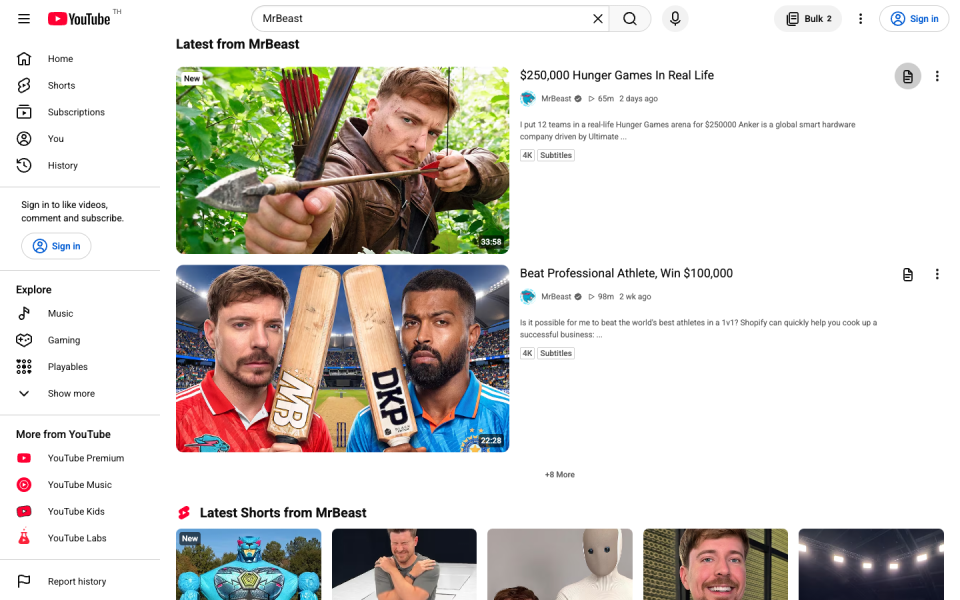
The copied text includes source information. Transcripto retrieves existing captions; it does not listen to the audio to create missing words. Check quotes against the video, especially names and technical terms in automatic captions.
Choose what to keep
- Clean text for notes: leave Include timestamps off in the extension popup. Already copied time labels? Use the timestamp cleaner.
- Time references: turn timestamps on before copying if you need to revisit a passage.
- A saved file: use the Bulk panel to download TXT or Markdown.
- Several videos: download transcripts from multiple YouTube videos.
Does this work on a phone?
Transcripto currently supports desktop Google Chrome 142 or later. It does not install into mobile Chrome or Safari. You may be able to read a transcript in YouTube’s mobile interface, but text selection varies. The manual computer method above is a separate option that does not require Transcripto.